


AE + Aerie
4.212.72K Reviews
App Specs
- Version
- 26.15.0
- Updated On
- License
- Free
- Downloads
- 5,000,000+
- Developer
- AEMobileApp
- Categories
- Shopping
- Platform
- Android, iOS
Screenshots

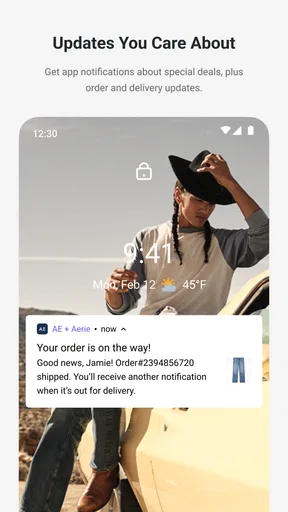
 Analysis by AppCompare
I approached AE + Aerie as a practical shopping companion rather than just another brand storefront. My overall impression is clear: it works best when I already know the American Eagle or Aerie style I want and need a convenient way to browse, compare, and buy from my phone. It is less compelling as a general fashion-discovery tool, especially if I want to search across many brands or compare prices in one place.
The app is free, aimed at everyone, and belongs to the shopping category. It comes from AEMobileApp, has built a 4.2 average from around 47 thousand ratings, and has passed 5 million installs. Those figures suggest that it is a well-established shopping app rather than a short-lived experiment. I also appreciate that its history goes back to November 2, 2011, because a long presence in mobile shopping usually means the basic experience has had time to mature.
What the app feels like in everyday use
The first thing I noticed is that AE + Aerie has a focused purpose. Instead of mixing unrelated retailers, marketplaces, and product types, it keeps attention on American Eagle and Aerie clothing and accessories. That narrow scope can feel refreshing. When I am shopping for casual clothes, denim, intimates, loungewear, or similarly styled items from these brands, I do not have to work through the noise that comes with a broad marketplace.
That focus also creates the app’s central trade-off. A dedicated retailer app can make browsing feel more coherent, but it cannot replace a multi-brand shopping service. If I am still deciding whether I want jeans, sneakers, a jacket, or something from an entirely different label, a general shopping app is usually better for the first stage of research. AE + Aerie becomes more useful once my search has become specific.
I found the app most natural for short shopping sessions. I can open it with a particular goal, look through the relevant range, inspect an item, and decide whether to save it for later or continue toward checkout. That makes it more suitable for planned purchases than for endlessly browsing without a clear idea. Its value is not that it transforms shopping; it is that it puts a familiar brand relationship into a mobile format.
The current version is 26.15.0 and requires at least OS 10. That is worth checking before installing, particularly if the phone is older or has not been updated for some time. On a compatible device, the app is free to download, so the main decision is not whether the app costs anything to install. The more important question is whether a dedicated American Eagle and Aerie experience matches the way I shop.
Why the focused catalog is a real strength
My strongest positive takeaway is the reduced mental effort. On a large marketplace, a search for a basic clothing item can produce countless brands, inconsistent sizing approaches, and very different product photography. A brand-specific app gives me a more controlled environment. I can concentrate on the look, fit direction, and product range associated with American Eagle and Aerie instead of filtering through unrelated sellers.
Worth Reading Before You Choose

EA SPORTS FC Mobile 26 Is a Bigger Football Game, but It Takes Time

Flipboard Shows What News Apps Must Do Beyond the Feed

Switching to Android Auto Means Rethinking Your Driving Routine

Google Calendar Makes a Crowded Week Easier to Manage

Ludo King Makes the Most of the Minutes Between Plans

Baby Panda World Brings Quick Play to Modern Phones, but Its Game Library Feels Busy
This is especially useful when I am replacing something I already own. If a pair of jeans, a bra, sleepwear item, or casual top has worked well for me, returning to the same brand can be quicker than starting from scratch. I can use the app as a repeat-purchase tool: check what is currently available, inspect the alternatives, and decide whether a familiar style is still right for me.
There is also a useful distinction between browsing on a phone and browsing through a physical store. In a store, I can touch fabric and try on several sizes, but I may have limited time and may not see every available variation. In the app, I can take a slower look at product presentation and compare several candidates without carrying anything around. That does not solve the fit problem, but it does make the selection stage more deliberate.
One practical tip is to use the app before going shopping in person, even if I expect to visit a store. I can narrow down the styles and colors that interest me, then treat the physical visit as a fitting and fabric-checking step rather than an open-ended search. This hybrid workflow is more useful than treating the app and store as competing options. The app handles preparation; the store handles tactile confirmation.
A realistic shopping scenario
Imagine I need a casual outfit for a weekend trip but do not want to spend an evening visiting several shops. I would begin by deciding what is missing: perhaps jeans, a top, and comfortable underlayers. I would use the app to browse the relevant American Eagle and Aerie sections, open a few candidates, and compare the details that matter to me, such as the overall cut, available options, and whether each item fits the style I already wear.
Rather than adding the first acceptable item to a cart, I would keep a small shortlist. This is one of the better ways to use a retail app: separate discovery from commitment. A product can look right in isolation but fail when compared with the rest of the outfit. Reviewing several choices together helps me notice when I am buying duplicates or choosing something that does not work with what I already own.
If I am uncertain about fit, I would not rely on the app alone. I would compare the product information with clothing I already have from the same brand and, where possible, use a store visit to confirm the feel and proportions. This is a meaningful limitation of mobile clothing shopping: a polished product page cannot reproduce the experience of trying on fabric, checking stretch, or seeing how a garment sits while moving.
For a repeat customer, the same scenario becomes faster. I already know which styles tend to suit me, so the app becomes a convenient way to check current choices without browsing unrelated products. For a first-time buyer, I would use it more cautiously and treat the first order as a learning purchase rather than assuming that every item will fit identically.
Where the experience can create friction
The biggest weakness is not a lack of purpose; it is the boundary created by that purpose. Because the app centers on two connected brands, it is not the right tool for comparing the entire clothing market. I cannot use it to decide whether American Eagle or Aerie offers better value than a different retailer unless I leave the app and perform that comparison elsewhere. For shoppers who prioritize broad choice, a marketplace or department-store app will be more efficient.
Clothing also brings a second kind of friction: the app can help me choose, but it cannot remove uncertainty. Fit, fabric weight, stretch, and color can all feel different in person. Even when product information is clear, I may still hesitate before ordering an unfamiliar cut. That hesitation is not unique to this app, but it matters because the app’s convenience can make it tempting to buy too quickly.
My advice is to avoid using a dedicated brand app as an impulse machine. I would review the whole basket before purchasing and ask whether each item fills a real gap. This is particularly important when several products look similar. A focused catalog makes it easy to stay within one visual style, but that can also make duplicate purchases feel more attractive than they really are.
Another trade-off is that the experience is most rewarding for people who already recognize the brands. If I have never bought from American Eagle or Aerie, I may need more context before I understand which parts of the catalog suit my preferences. A broad retailer can help me compare silhouettes and prices across labels, while this app expects me to explore within its own fashion world.
Useful habits for getting more from it
I would begin with a specific shopping mission instead of opening the app with no plan. A short note such as “replace everyday jeans” or “find comfortable homewear” gives the browsing session a useful limit. It also makes it easier to judge products by purpose rather than by how appealing each individual image looks.
My second habit would be to compare items by role, not only by appearance. Two tops can look similar on a screen but serve different purposes in a wardrobe. One might work for layering, another for warmer weather, and another for relaxed indoor use. Thinking this way helps me avoid a common retail-app mistake: choosing the most attractive product page instead of the item I will actually wear most often.
A third tip is to use the app as a planning tool before committing money. I would create a shortlist, step away, and return later with a clearer view of what I still want. That pause is valuable because mobile shopping makes it easy to confuse browsing enjoyment with a genuine need. The app is at its best when it reduces effort, not when it encourages unnecessary additions.
I would also keep the operating-system requirement in mind before recommending it to someone with an older phone. The minimum OS is 10, so compatibility should be checked first. Since the app is free, there is little financial risk in trying it, but an installation is only useful if the device can run the current version comfortably.
Who should use it, and who should choose something else
I would recommend AE + Aerie to existing customers who like these brands and want a direct mobile route for browsing their clothing. It is also a sensible choice for someone preparing for a store visit, replacing familiar wardrobe basics, or narrowing down a purchase without dealing with a crowded multi-brand catalog.
It may suit a younger shopper or a family member looking for accessible casual styles, and its Everyone content rating makes it broadly approachable from an age-classification perspective. Still, an age rating does not tell me whether the fashion, sizing, or price range matches a particular person. Those decisions require personal judgment and, for clothing, attention to fit and intended use.
I would point a different shopper toward a general marketplace if their priority is maximum variety, side-by-side brand comparison, or finding the lowest available price across many sellers. I would also suggest shopping in person first to anyone who has never tried the brands and feels unsure about fit. The app is convenient, but convenience should not replace information that only a fitting room or physical fabric check can provide.
For people who dislike creating a brand-specific shopping habit, the app may feel unnecessary. If I already have a favorite general retailer app and only buy from American Eagle or Aerie occasionally, opening a separate app may add little value. The dedicated approach pays off through familiarity and focus, not through universal usefulness.
My final assessment
After using it as a focused shopping tool, I see AE + Aerie as a solid choice for the right customer rather than a complete replacement for every way of buying clothes. Its best quality is concentration: it keeps American Eagle and Aerie products together and makes planned browsing easier than searching through a broad marketplace. That is a meaningful advantage when I already know what I want or already trust the brands.
Its limitations are equally straightforward. It cannot let me compare the wider clothing market, and it cannot eliminate uncertainty about fit or fabric. I would not use it as my only fashion-shopping app, and I would not recommend rushing through checkout simply because the mobile experience is convenient.
Still, the combination of a free download, a long-running presence, a 4.2 average, and more than 5 million installs gives me confidence that it is worth trying for regular American Eagle or Aerie customers. My verdict is positive but specific: use it as a focused brand companion, not as a universal shopping destination. If that matches your habits, it can save time and make repeat shopping pleasantly simple. If you need broad comparison or hands-on fitting, another route will serve you better.
Pros
- Powerful motion-graphics tools for creating polished visual effects.
- Supports layered compositions and precise keyframe-based animation.
- Aerie adds useful workflow options for managing creative projects.
- Suitable for both quick edits and more advanced animation work.
- Can produce professional-looking results when paired with AE skills.
Cons
- The learning curve may be steep for users new to motion graphics.
- Complex projects can require substantial storage and processing power.
- Some features may feel less convenient on a mobile screen.
- Export times can increase noticeably with high-resolution compositions.
- Best results may depend on compatible devices and external assets.
FAQs for AE + Aerie
What is AE + Aerie, and what can I use it for?
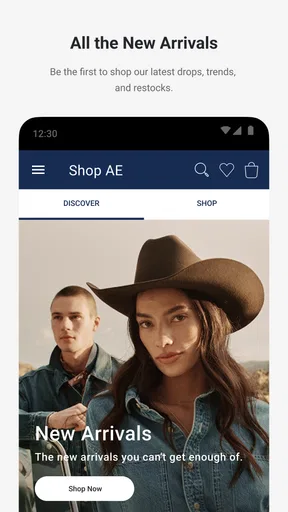
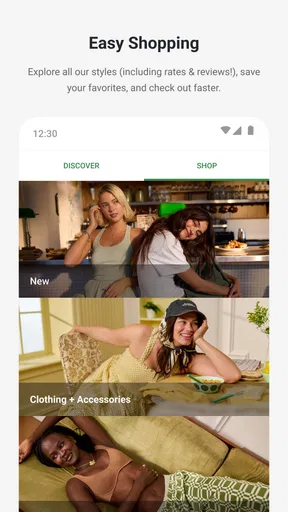
AE + Aerie is the official shopping app for American Eagle and Aerie, bringing both brands together in one mobile experience. After installing it, you can browse clothing, underwear, activewear, accessories, and seasonal collections, view product details, check available sizes and colors, and place orders directly from your phone. The app is especially useful for shoppers who want a convenient way to discover new arrivals and manage purchases.
Can I find discounts, rewards, or exclusive offers in AE + Aerie?
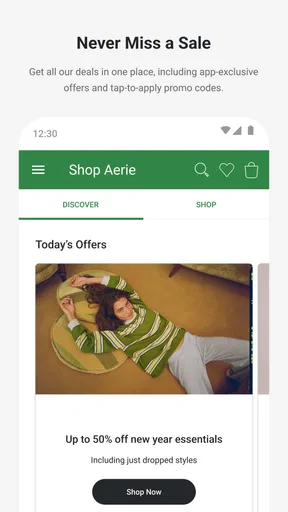
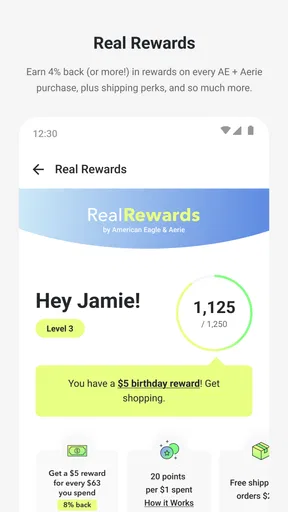
Yes. AE + Aerie commonly includes access to promotions, sale items, personalized offers, and benefits connected with the brands’ loyalty programs, although availability can depend on your location and account status. After signing in, it is worth checking the rewards area, promotional banners, and notifications before completing an order. Some discounts may require an eligible account, a minimum purchase, or a specific promotional code.
Does AE + Aerie support account management and order tracking?
The app allows customers to sign in or create an account so they can save personal information, review previous purchases, manage preferred details, and follow current orders. Order tracking information is normally displayed once a purchase has been processed and shipped. If you prefer not to create an account, some shopping features may still be available, but guest checkout and order lookup options can vary by country and current app version.
Can I check product availability, sizes, and store pickup through the app?
AE + Aerie provides product pages with information such as available colors, sizes, prices, descriptions, and care details. For many items, the app may also show whether a product is available at nearby stores or eligible for pickup, depending on local inventory and the services offered in your region. Store stock can change quickly, so availability shown in the app should be treated as an estimate until the order or reservation is confirmed.
Is AE + Aerie free to download, and what should I know about privacy?
The AE + Aerie app is generally free to download, although you will need an internet connection and may use mobile data while browsing products, viewing images, or placing orders. The app can request information needed for account services, payments, delivery, rewards, analytics, and notifications. Before installing, review the permissions and privacy policy available in your app store, particularly if you do not want promotional notifications or personalized shopping recommendations.


